1AnyDub
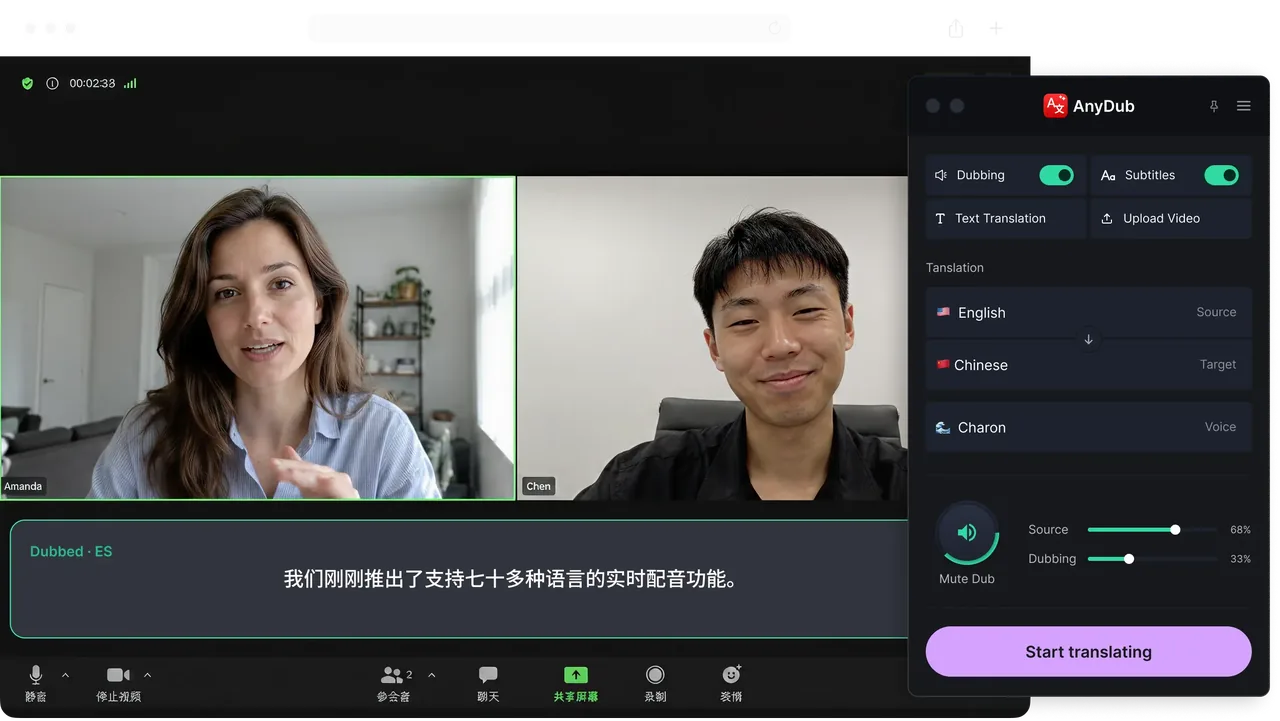
Live dubbing in the browser. AnyDub translates audio as it plays, in a Chrome tab, with subtitles in the player, a spoken voice track, or both. There is no upload and no processing wait, because there is no file. It works on YouTube, Netflix, streaming sites, local video files, and live calls on Zoom, Google Meet, Teams and Webex.
What it is best at: the moment you need to understand something and cannot wait. A live stream, a meeting in progress, a lecture in a language you do not read. More than 70 languages, all on the same plan, and a mixer that keeps the original voice audible underneath.
What it does not do: it will not hand you a finished dubbed file to publish, and it does not clone a specific person's voice. If your goal is a deliverable rather than comprehension, use one of the batch tools below.
2HeyGen
Batch dubbing with avatars. Upload a video, get a localised version back, with lip-sync and avatar generation as the headline features. Aimed squarely at marketing and training content you own and intend to distribute.
Best for: producing a polished Spanish or Japanese cut of your own video. Not for: anything live, anything you do not own, and anything you want to watch in the next five minutes.
3ElevenLabs Dubbing
Voice-first batch dubbing. Strong synthetic voices and voice cloning applied to uploaded audio and video, with control over the resulting speech quality.
Best for: content where the voice itself is the product, such as podcasts and narration. Not for: live audio, since the model works on a completed file.
4Rask AI
Volume localisation. Built around translating a library of existing videos into many languages, with subtitle and voice output per video.
Best for: a creator or company with a back catalogue and a localisation budget. Not for: real-time viewing or meetings.
5Descript
An editor that also translates. Descript is primarily a transcript-based video and audio editor, with translation and overdub as features inside that workflow.
Best for: editing your own recordings where translation is one step in post-production. Not for: consuming other people's content live.
6Built-in platform captions
Zoom and Google Meet both offer translated captions. When they cover your language pair and your plan includes them, they are the path of least resistance, because there is nothing to install.
The catch: the language pair lists are short, availability is tied to specific paid tiers, enabling them is usually an account administrator's decision rather than yours, and the output is text only. There is no spoken translation. That is the gap covered on the Zoom and Google Meet pages.